


Indeed
App Developer: Indeed Inc
Search jobs on Indeed that match your resume and career goals, with Indeed for ChatGPT. Connect your Indeed profile to search for job opportunities based on your resume, skills, and career history. View job details and company insights without ever leaving the chat. With Indeed in the conversation you can: Search for jobs using your Indeed profile View details for specific jobs Learn more about potential employers Tap apply to take the next steps on Indeed.
Search jobs on Indeed that match your resume and career goals, with Indeed for ChatGPT. Connect your Indeed profile to search for job opportunities based on your resume, skills, and career history. View job details and company insights without ever leaving the chat. With Indeed in the conversation you can: Search for jobs using your Indeed profile View details for specific jobs Learn more about potential employers Tap apply to take the next steps on Indeed.
- Connector type
- MCP
- Distribution channel
- Ecosystem Directory
- App categories
- Business
- Countries
- UKUS
- Labels
- interactive: true
- App review status
- RELEASED
- App version
- 2.0.0
- Branding website
- https://www.indeed.com/
- Privacy policy
- https://hrtechprivacy.com/brands/indeed
- Terms of service
- https://www.indeed.com/legal?hl=en
- Date added
- February 5, 2026
- Last seen
- July 6, 2026
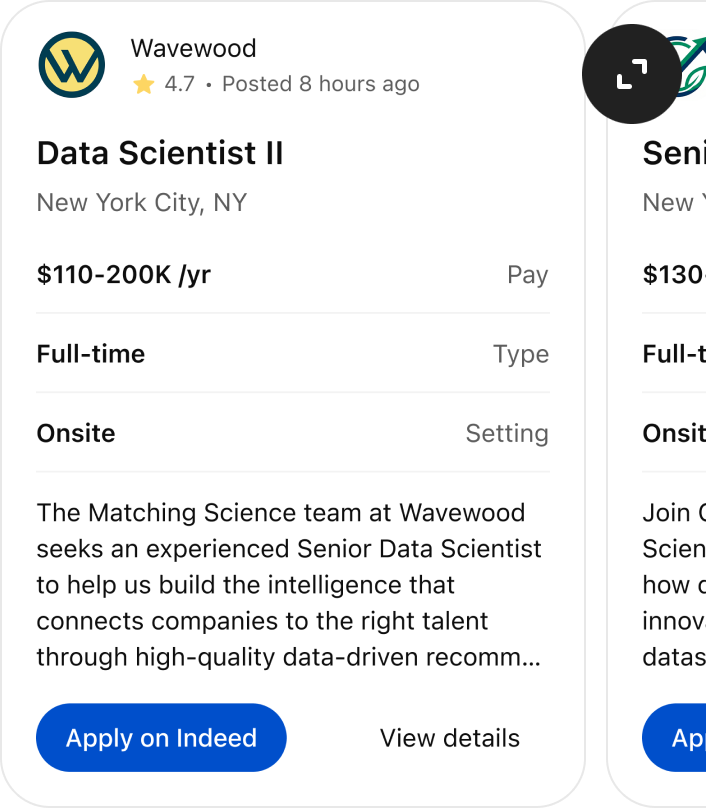
“@Indeed find me data scientist roles in New York City”
Featured App History
Currently a featured app
No
Based on today's date
Number of days featured
0
App Features
Total actions
3
Total templates
3
Actions
Job Search
Search for jobs on Indeed. These jobs are sourced from Indeed's job search API and are automatically displayed to the user as UI components. **Rules:** 1. Before sending a search request, carefully consider and refine the search query to maximize the chances of returning relevant job results. Simplify the query to focus on role names and industries, and only specify search terms that would likely be mentioned in job listings. 2. If your initial search returns zero jobs, expand the scope of the search or search for related roles, and retry the search. Continue the process of expanding the search and retrying as needed until you obtain results from the tool. Do not return a final search result with zero jobs—ensure the last result always contains jobs, even if they only approximately match the user's request. 3. If a user requests to search for jobs in multiple locations, conduct the search for only one location at a time in each reply, and indicate to the user that searches are limited to one location per request. Suggest performing additional searches for other locations in subsequent replies. 4. Use the full JSON response for context only. DO NOT relist or enumerate individual results in the assistant’s reply, as they are already visible in the UI. 5. By default, summarize patterns, trends, or insights relevant to the user and conversation. 6. Reference specific jobs ONLY when explicitly requested. 7. When referencing individual jobs: a. The result includes links to apply for each job. If you do embed mention job titles in your response to the user, it is very important to embed the apply link to EACH job title so the user can click the job titles to apply for the jobs. b. Keep URLs intact - don't strip parameters. Returns: ToolResult with structured job search results and Apps SDK metadata
Enabled: true
Company Insights (OpenAI)
Query a knowledge base to retrieve information about a specific company (with OpenAI Apps SDK widget support).
Enabled: true
Get Resume
Get resume information and return formatted results. Use this before other tools like searching or applying to get more information on the user's background.
Enabled: true
Templates
ui://widget/job-search-results-1-76e77c7.html
Searching for jobs
Searched jobs
ui://widget/company-insights.html
Fetching company insights...
Company insights ready
ui://widget/resume-display/1-5769417/component.html
Retrieving resume
Resume retrieved

